
Scan lifecycle and release decision
Understand how an artifact becomes scan evidence and a policy-aware CI decision.
After deployment and first-time setup, every JustScan workflow follows the same decision path: identify an artifact, submit it to a configured scanner provider, collect evidence, evaluate organization policy, and expose the terminal outcome to people or automation.
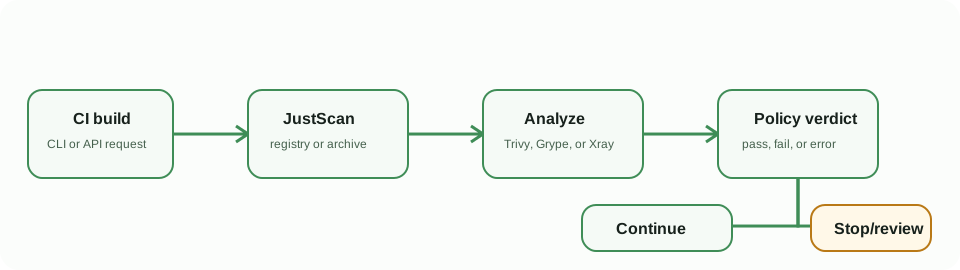
Lifecycle states
- Submission: the application, CLI, or API accepts a registry image, local image archive, Helm-derived image, or GitOps-discovered image.
- Analysis: JustScan pulls or receives the artifact and uses the selected provider. Scan step details reveal whether work is queued, active, waiting on Xray, importing results, or needs attention.
- Evidence: completed scans expose findings, package details, available SBOM data, policy context, comments, and comparisons.
- Verdict: organization policy evaluates the completed evidence. A policy failure is distinct from an operational or scan-execution error.
The verdict is immutable scan-time evidence. Later CVE Intelligence updates can produce a separate current policy projection for an authorized completed scan, but they never rewrite the original finding, compliance result, compliance history, or scan status. A rejected or not-affected CVE can resolve the current projection, while disputed, unknown, incomplete, or conflicting intelligence conservatively holds the failure as needs validation. Review the Scan Details banner and run a confirming rescan before treating any current projection as authoritative.
Process Center and durable scan work
An accepted authenticated image scan also appears in the Process Center. The process record is linked to the scan and its personal workspace or organization, so it follows the same authorization boundary as the scan itself. It is durable: a request finishing, a bounded in-memory scanner queue filling, or a backend restart does not by itself discard accepted work. Pending work is recovered and reconciled from the persisted scan state.
The process status describes execution, not the release verdict:
| Process state | Meaning |
|---|---|
| Queued | The scan was accepted and is waiting for a scanner worker. |
| Running | A worker claimed the scan. The phase identifies the current persisted scan step. |
| Succeeded | Scan evidence was persisted and the scan reached completed. This does not mean policy passed. |
| Failed | Execution ended with an operational error, such as an unavailable registry or scanner timeout. |
| Cancelled | The scan was explicitly cancelled before completion. |
Phases are sourced from real scan steps such as preparing the image, scanning, processing results, or finalizing the report. A phase may be shown without a percentage: JustScan does not invent a determinate percent when the scanner has not supplied a meaningful total. Use the scan's step output and terminal error for detail.
Deleting a scan also removes its linked process record and any queued process-center entry; it does not retain a separate copy of scan evidence. Completed and failed entries can be removed individually or in bulk from the Process Center. This only clears them from your own Process Center view; it does not delete shared organization history or backend diagnostics. The Process Center currently has no retry action: correct the recorded execution cause and submit a new scan when a fresh attempt is needed. A restart recovery or fresh submission must not be confused with a policy result; the scan record remains the source of truth.
Choose the source deliberately
Use a registry image when JustScan can authenticate to the registry; use CLI local-image or archive mode for unpublished build outputs; use Helm for rendered chart workloads; and use GitOps discovery for continuously managed deployment repositories. See scan sources for the selection table.
For CI, make the terminal verdict the gate. The CLI returns 0 for pass, 1 for policy failure, and 2 for an operational error. Do not configure a fallback that turns errors into a release pass.