
JustScan documentation
Deploy, set up, integrate, and operate the current JustScan release.
JustScan helps teams scan container images and Helm charts, investigate findings, and apply organization policy before software ships. This portal documents the current JustScan release running in your environment. Use the release image reference when planning an upgrade.
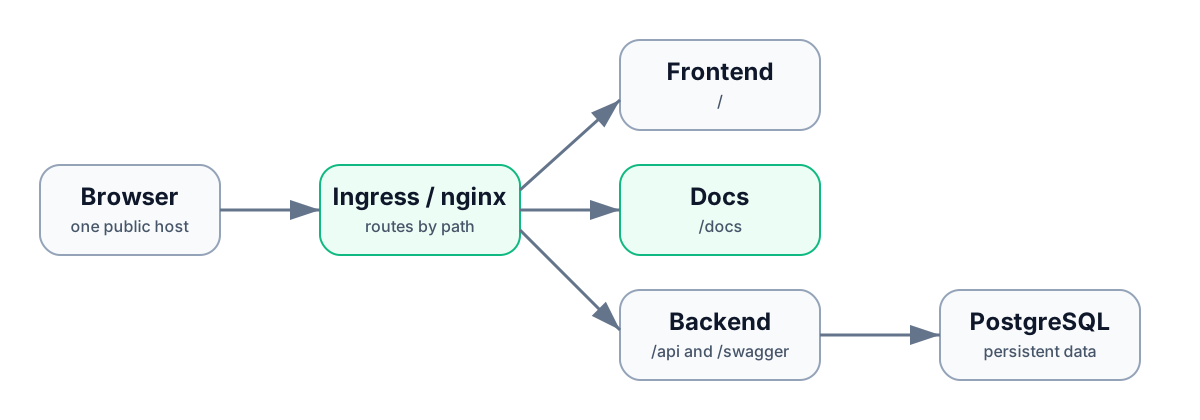
Follow the deployment lifecycle
| Stage | Start here | Outcome |
|---|---|---|
| Deploy | Choose Docker Compose or Helm | A healthy JustScan service with /, /api, /swagger, and /docs available. |
| Set up | Complete first-time setup | An administrator, authentication path, organization, and first scan. |
| Scan | Choose a scan source | The right workflow for registry images, local artifacts, Helm, or GitOps. |
| Govern | Create an organization | Shared ownership, roles, policies, tokens, and audit history. |
| Integrate | Run JustScan in CI/CD | A policy-aware automation workflow with safe exit handling. |
| Operate | Observe and maintain JustScan | Recoverable upgrades, scanner health, backups, and troubleshooting. |
Recommended rollout
- Deploy with Docker Compose or Helm, then verify
/api/v1/healththrough the intended public hostname. - Create the initial administrator with local authentication or OIDC authentication.
- Create an organization, invite users, configure a registry, and complete a first governed scan.
- Add organization policies, notifications, and a scoped automation token.
- Start with a non-blocking CI/CD integration, then make the verdict required after scan, policy, and recovery behavior are understood.
- Establish the backup and recovery, upgrade, monitoring, and troubleshooting routines before relying on JustScan for release decisions.
Common tasks
- Install with Docker Compose
- Install with Helm
- Set up OIDC
- Create an organization
- Set up a registry
- Review findings and SBOMs
- Review CVE Intelligence
- Recover from an operational problem
For endpoint-level exploration, use the interactive API reference.