
Deploy JustScan
Choose Docker Compose or Helm and make a self-hosted JustScan service ready for first-time setup.
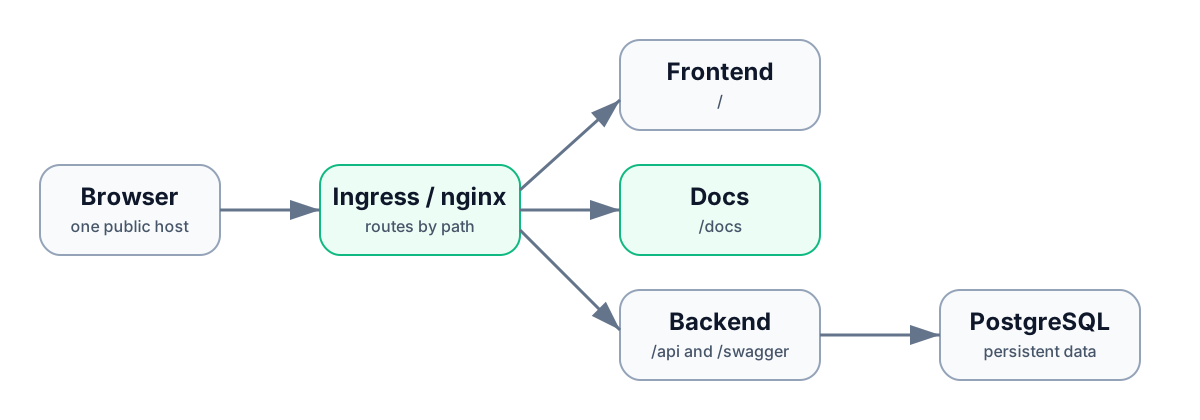
JustScan is delivered as separate backend, frontend, and documentation services, with PostgreSQL for persistent application data. Choose the deployment model that matches the platform you already operate, then continue to first-time setup after the health checks pass.
Select a topology
| Topology | Use when | You operate |
|---|---|---|
| Docker Compose | A single host is appropriate for the expected scan volume. | nginx, named Docker volumes, images, and host-level backups. |
| Helm | Your platform standard is Kubernetes or you need managed ingress and secrets. | Kubernetes resources, storage classes, ingress, and optionally an external PostgreSQL service. |
Use matching backend, frontend, and documentation image tags from one JustScan release. The docs service is intentionally deployed separately but stays on the same hostname at /docs.
Common deployment sequence
- Create the public HTTPS hostname and route
/,/api,/swagger, and/docsthrough the same proxy or ingress. - Provision PostgreSQL and backend persistence. PostgreSQL stores JustScan data; the backend volume retains runtime data such as scanner caches.
- Inject the database password, JWT secret, and encryption key from your secret manager. Do not use development defaults in production.
- Deploy the services and wait for backend
/api/v1/healthbefore treating the frontend as ready. - Open the application, docs, and Swagger on the public hostname. Confirm the remaining production readiness checks, then complete first-time setup.
Public routes
| Route | Expected result |
|---|---|
/ | JustScan application and authentication screens |
/api/v1/health | Healthy backend response |
/swagger | Generated API reference |
/docs | This documentation service |
Use reverse proxy, ingress, and TLS when publishing these routes through a separate edge proxy. Use deployment configuration for YAML and BACKEND_ environment overrides.
Capacity and failure boundaries
Scanner work happens in the backend, so allocate its CPU, memory, network access, and persistent data for your largest image and expected parallel scans. Tune scanner.concurrency only after observing normal queueing and completion time. JustScan does not claim high availability or automated database backup: provide these through the surrounding platform if required.